




If you've been spending hours manually tracing drawings, clicking through PDF plans, and still second-guessing your quantities before submitting a bid, you're not alone. For most estimators, takeoffs are the single biggest time drain in the pre-construction process. Beam AI was built to solve that problem.
This guide walks you through the nitty-gritty of the platform. We’ll cover everything you need to know: what Beam AI is, how it works, how to access the platform, how to request a demo, and where it fits in your estimating workflow.
We’ll also list down the factors to consider when evaluating whether Beam AI is a fit for you, and share what Beam AI’s pricing looks like.
What is Beam AI and how does it work?
Beam AI is an AI-powered takeoff and estimating software for the construction industry. It’s designed to fully automate the most time-consuming part of the bidding process: quantity extraction from construction drawings. Instead of an estimator manually measuring, counting, and calculating from PDF plans, Beam AI reads those drawings and pulls out the quantities for you.
Think of it as a full-time junior estimator that never takes a break. It reads your uploaded plans (including spec docs, architectural drawings, legends, and notes) and delivers structured, bid-ready outputs within 24 to 48 hours, depending on the trade and project complexity.
Currently, Beam AI is used by 1,200+ companies across the US and Canada to run takeoffs and estimates for multiple trades in the construction industry.
Now, let’s look at Beam AI’s workflow:
Step 1: Upload your site plans in PDF format. Beam AI accepts all supporting documents — specs, legends, architectural plans — and reads them together as a complete set.
Step 2: Confirm the scope of work for your takeoff. The platform already pre-populates the quantities needed for your aligned trades; you review and confirm. If your GC or client has specific packaging requirements or quantity breakdowns, you can note them under "Project-Specific Deviations."
Step 3: The AI scans your uploaded files, reads through the specs and notes, and automatically extracts quantities. For the DFY model, the output also goes through a QA cycle internally, along with instant excel estimates.
Post-analysis, you receive your completed takeoff, delivered as bid-ready output. Beam AI offers two models: the Do-it-yourself (DIY) model and the Done-for-you (DFY) model. In the DIY model (for HVAC and Plumbing), you get both estimates and takeoffs in minutes. And in the DFY model (for all trades), the output is shared in 24 to 72 hours after review from an internal QA team. The human-in-the-loop layer is also suggested for large-scale, complex projects where both accuracy and speed are required.
Wondering who Beam AI is for? It supports multiple trades. Its multi-trade capability also makes it useful for general contractors managing complex, multi-scope projects as well as subcontractors focused on a single trade.
How to access Beam AI
Beam AI is a cloud-based platform. There is no need for any software installation, on-premise setup, or hardware. Once you have the license, it can be accessed through the iBeam Portal — available from any browser, on any device.
So, whether you are in the office, at a job site, or working remotely, you can access Beam AI from anywhere. This is a meaningful difference from tools like PlanSwift or On-Screen Takeoff, which typically require desktop installations and more manual hardware management.
Once you have access, you are all set to do your own takeoffs, create estimates, and manage your bid pipeline. Of course, to do any of this, you need a license. More on that (and Beam AI’s pricing plans) later.
How to book a demo of Beam AI
The needs and requirements of no two businesses are the same. And a demo is a great way to ensure that the platform caters to what matters to you.
Beam AI offers a personalized demo in which a product expert walks you through the platform using real project scenarios.
Booking a demo is super easy. You can book a demo from the Beam AI website. Once you click the button, you're taken to a dedicated page with a form. All you have to do is add your details — including your name, email, company name, phone number, and the trade you operate in. This helps the product team tailor the demo to your specific workflow and estimating challenges.
In the demo call, the product expert shows you how Beam AI processes real drawings, extracts quantities, and delivers estimate-ready outputs for your specific trade.
What you can expect during the demo
The Beam AI demo is not a generic product tour. It's a live walkthrough tailored to your trade and workflow. Here's what typically happens:
Live takeoff demonstration: You get a complete walkthrough of the platform from plan upload to output in real time. The product expert shows how Beam AI does takeoff and estimates via a real set of project drawings.
Accuracy validation: The product expert also walks you through Beam AI's DFY model. Apart from explaining how the human QA layer adds accuracy, they also explain which projects are more suited for DFY.
Trade-specific workflows: The demo is customized to your trade. Whether you're in HVAC, concrete, roofing, or structural steel, the product expert focuses on the features, output format, and quantity types most relevant to your bidding process.
Apart from this, any questions you have about the product are also answered, along with a discussion of Beam AI pricing.
Beam AI also offers a paid pilot for businesses that want to evaluate how the platform can support their operations with a real-life project. You have the option to run a new takeoff on the platform to verify it against how it looks compared to when done in-house. Or you can run a takeoff you have already done to verify the platform's accuracy. We provide this feature so that you can make an informed, confident decision about the platform.
Prerequisites for getting started
Getting started with Beam AI doesn't require a major/ lengthy process. Infact, it takes less than a day to onboarding. Here are the few things will help you to hit the ground running:
Project drawings in PDF format: Beam AI works from PDF plans. Have your current project drawings ready — architectural plans, spec documents, legends — so the product team can demonstrate the platform using your actual files during the demo or initial setup.
Clear scope of work: Beam AI pre-populates the scope based on your trade alignment, but having clarity on what quantities you need (and any project-specific deviations from standard packaging) ensures the output matches your workflow.
Basic understanding of your estimating workflow: You don't need to be a software expert, but knowing how you currently structure your estimates — the format, cost library, markup logic — helps during onboarding so the platform can be configured to align with your existing process.
For teams trying to scale onboarding and reduce dependency on senior estimators, structured onboarding and training estimators can make adoption of Beam AI significantly smoother.
Key features to look for while evaluating takeoff software
Not all takeoff software is built the same. Before committing to any platform, evaluate these capabilities carefully:
Bid dashboard
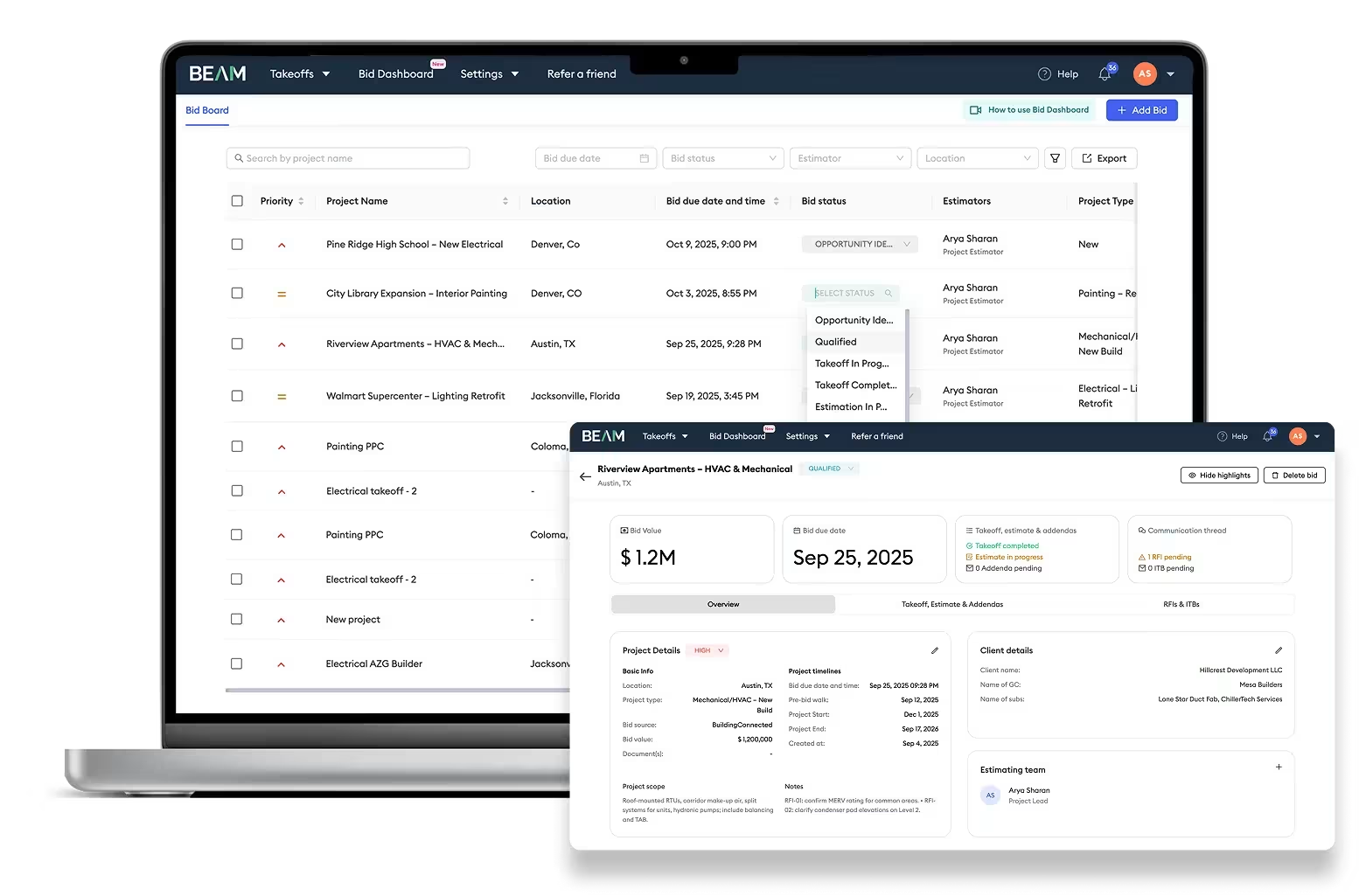
The bid dashboard is an essential tool to view your entire bid pipeline at a glance. It brings visibility and control across everything in flight.
The biggest advantage of a bid dashboard is the support it provides for capacity planning, team coordination, and ROI visibility.
Beam AI has an in-built Beam Dashboard that comes free with the license. Some of its features that our customers absolutely love are:
- Custom bid statuses to align the team's workflow.
- Automated reminders before bid submissions and when a new bid is created.
- Once-click bid and takeoff creation.
- Completely customizable view that helps surface information most valuable to you.
Automated quantity takeoffs
This is the core functionality of Beam AI. While some platforms give you the digital tools to do it yourself faster, Beam AI completely automates the entire process. The AI reads the plans and extracts quantities without requiring you to trace, click, or measure anything manually.
Handling large plan sets
A plan set for a commercial or infrastructure project can run hundreds of pages. Beam AI can handle large data uploads without degrading performance or accuracy. In fact, the DFY model helps businesses process large files with both speed and accuracy.
Revision and addenda management
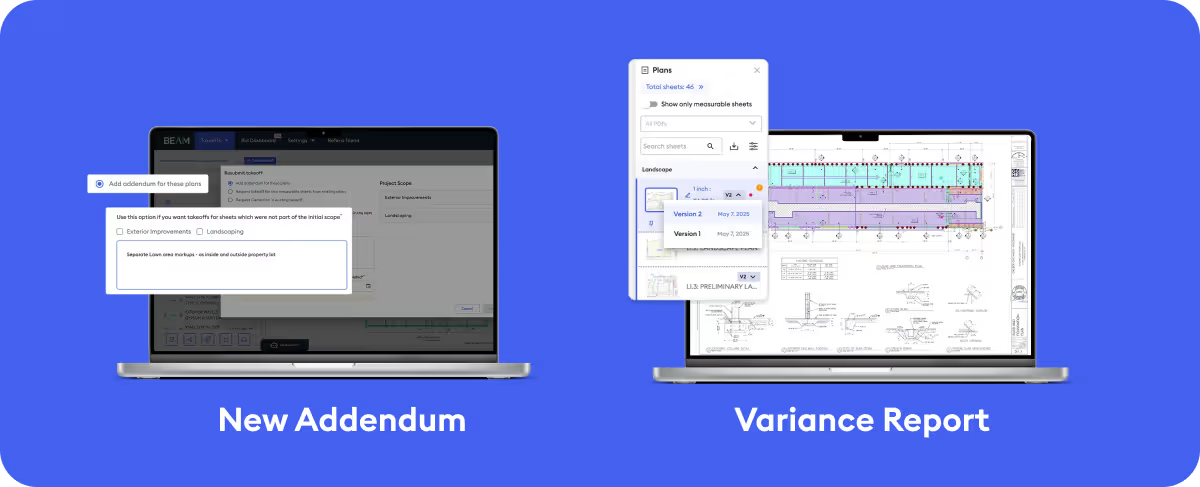
Last-minute plan changes and addenda are a reality of the bidding process. Without a platform like Beam AI, estimators are left scrambling to redo everything from scratch. Which disrupts everything they are working on. Thus, revision and addenda management are important considerations.
Resubmitting a takeoff is easy with Beam AI. All you have to do is re-upload the plan, and you get a revised takeoff that clearly calls out the difference between the two versions. This makes refreshing the estimates easier as well. No significant additional manual effort is required.
Standardized cost libraries for estimating
Quantity takeoffs only get you halfway. The software's ability to tie those quantities to standardized material and labor costs — and let you update rates centrally — determines how fast you can get from takeoff to bid.
Beam AI includes centralized rate and markup controls: update labor rates, material pricing, or markups once, and the platform automatically applies those changes across the entire estimate.
Collaboration and team workflows
Estimating rarely happens in isolation. Teams need to access the same drawings, share project data, and keep everyone aligned without version conflicts. Since Beam AI is cloud-based, teams can access drawings and takeoffs from anywhere in real time, collaborate on projects, filter by team member, and share outputs without email attachments or manual file transfers.
Why feature selection matters in estimating software (and how it impacts the output)
Choosing a takeoff and estimating software isn't just about which tool has the longest feature list. The features you choose, and how well they fit your workflow, directly determine your bid competitiveness, team efficiency, and project profitability.
Accuracy impact on project cost
Quantity errors in a takeoff compound downstream. Understated quantities lead to underbidding and margin erosion. Overstated quantities lead to losing bids on price. The accuracy of your takeoff is the foundation of everything else in the estimate.
Beam AI tackles this in two ways:
- The platform’s AI trains itself as and when you work with it, so with just a couple of inputs, the result aligns with the desired output.
- The DFY model comes with a human QA layer. This ensures accuracy isn’t impacted even when the drawings are complex or large-scale.
Handling large terrain datasets
In civil, utility, and infrastructure projects often involve large terrain datasets and complex site conditions that traditional tools struggle to process efficiently. Software that can't handle these datasets accurately forces estimators to supplement digital calculations with manual ones, negating much of the time savings.
Evaluating a tool's performance on large, complex plan sets — not just simple residential drawings — is essential before committing to it for infrastructure-scale work. With Beam AI, this factor isn’t a problem, as it can serve most construction trades.
Bid speed and consistency
In competitive bidding environments, speed matters just as much as accuracy. The faster your team can turn around an accurate estimate, the more bids you can submit within the same timeframe.
Beam AI users report submitting 3x more bids, even during peak season. This is possible because of the bottleneck caused by manual takeoffs is completed eliminated. Consistency matters equally: when takeoffs follow the same structured process every time, the quality of estimates doesn't depend on which team member handles a given project.
Beam AI vs traditional takeoff software
Legacy takeoff tools like PlanSwift, On-Screen Takeoff, Bluebeam, and StackCT are built around a fundamentally different model: they provide estimators with better digital tools for manual takeoff. But you still have to put in manual effort and time tracing, clicking, measuring, and counting — just on a screen instead of paper. The software assists; the estimator does the work.
Beam AI works in the opposite way. The platform does the takeoff for you. You upload the plans, confirm the scope, and receive the completed quantities. Your team's involvement is in reviewing and pricing the output, not producing it.
Here's how that difference plays out across key dimensions:
Automation level: Traditional software is semi-automated at best. Some tools offer partial AI features, but quantity extraction still requires significant manual input. Beam AI is the only platform in its category that offers fully automated takeoffs with built-in human QA review across multiple trades.
Time savings: Traditional tools can reduce takeoff time compared to paper-based methods, but they still require hours of manual work per project.
Quality assurance: Traditional platforms place the burden of accuracy entirely on the estimator. If you miss something or miscalculate, there's no catch. The AI is pretty accurate, and adding the human QA layer on top of that (in the DFY model), so there are essentially no misses.
Cloud collaboration: Tools like PlanSwift and On-Screen Takeoff have limited or no cloud collaboration capabilities. Beam AI is cloud-native: full team access, real-time project sharing, and anywhere access from day one.
Learning curve: Traditional tools often require significant training to use effectively, especially for newer estimators. But there’s essentially no learning curve involved with Beam AI because it is intuitive to use.
How Beam AI helps you scale estimating
The traditional constraint on estimating capacity is headcount. If you want to bid more jobs, you hire more estimators. Beam AI breaks that constraint.
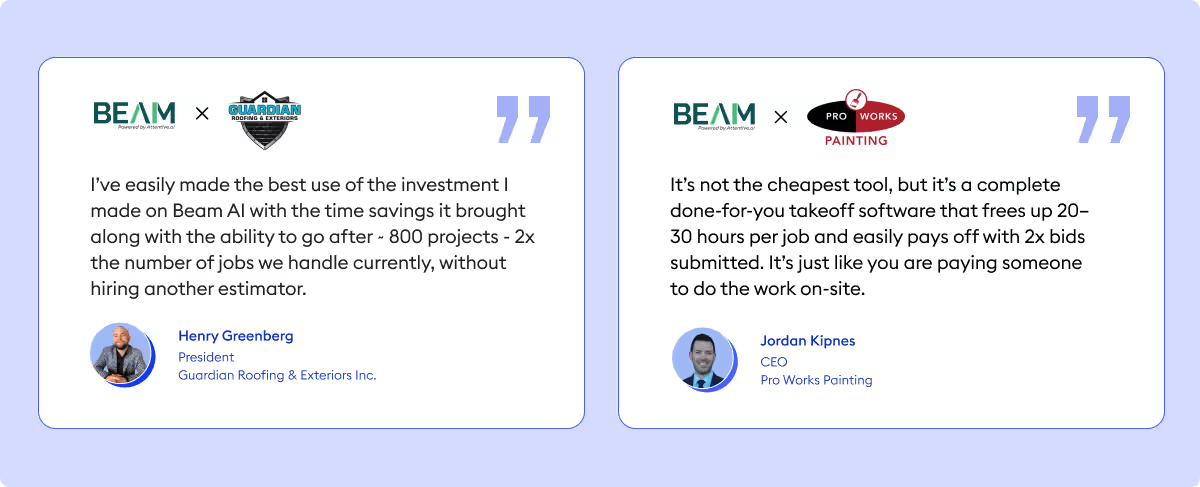
Because the platform automates the most time-intensive part of estimating — the takeoff itself — your existing team can handle a significantly larger bid volume without adding staff. Customers report bidding on three to five times as many projects per month with the same team size. Bommarito Construction's estimating team, for example, went from their previous bid volume to submitting eight more projects per month, recording revenue growth of $500K to $1M, without adding headcount. Even Rays Stairs Inc. cut two days of manual work per week and saw its revenue grow from $900K to $2M within months.
This scalability has a compounding effect. More bids submitted means more wins. More wins at a consistent margin mean revenue growth without the overhead of proportional hiring. For growing contractors already stretched thin on estimating resources, Beam AI serves as an additional estimator — without the cost of a full-time hire.
Beam AI pricing: how much does the license cost?
Beam AI follows an annual license-based pricing model, structured around the trade you operate in rather than charging per project or per takeoff. This means you can run takeoffs across your expected workload without worrying about per-use costs stacking up as your bid volume grows.
There are two delivery modes to choose from:
- Do It Yourself (DIY) with AI — You run the takeoff yourself using Beam AI's platform and get quantities extracted in approximately 10 minutes with 90% feature capture accuracy. This is the self-serve option for teams that want speed and control.
- Done For You (DFY) with AI + Human-in-the-Loop — Beam AI's team handles the entire takeoff and delivers QA-reviewed, bid-ready outputs within 24–72 hours. The quality assurance team reviews every output before it reaches your inbox, guaranteeing accuracy within ±1% of your in-house standard.
Here’s what the pricing looks like:
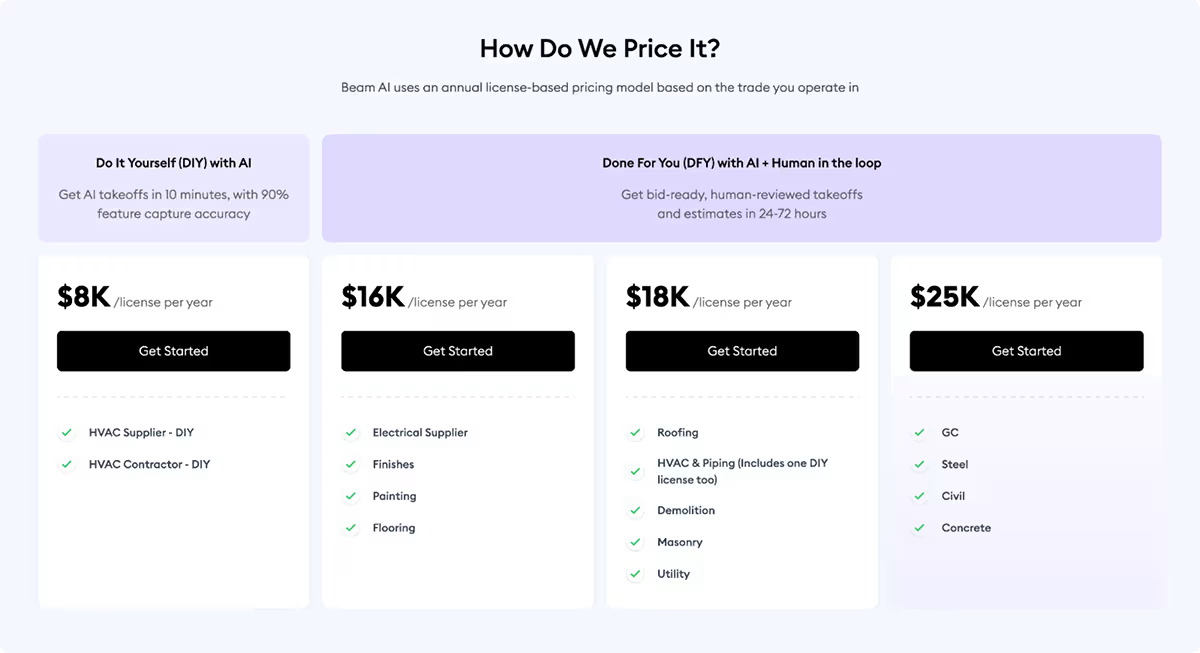
Onwards the $18K yearly license, you also get access to the hybrid model for HVAC and plumbing trades.
We recommend that teams get on a 30-minute discovery call with a product expert to explore pricing based on your trade and annual bid volume.
Businesses report seeing the ROI with Beam AI within the first year, and then some.
Conclusion
For estimators who are still spending the majority of their pre-construction time on manual takeoffs, Beam AI represents a meaningful shift in how the work gets done.
Whether you're a subcontractor looking to double your bid volume without hiring, or a general contractor managing multi-trade projects who needs reliable quantity data for budgeting, or even a senior estimator looking to bid more, Beam AI is built for the scale and complexity of real construction estimating workflows.
Ready to explore what Beam AI cam do for your business? Book a demo with us here.





.jpg)

.png)