




Why Does Construction Software Adoption Fail?
Construction software adoption fails when companies treat it as an IT install instead of a change in how people work. Without someone owning the rollout, a champion on the ground, standardized data entry, and a way to track adoption, crews often fall back to the same reality: working with spreadsheets when deadlines get tight, no matter how capable the software is.
So, why does this happen? The problem is often less about the software and more about changing behavior. Teams buy a platform, run one training session, and expect the field to change how it works on its own. It seldom does.
Poor project data and miscommunication already cost the U.S. construction industry more than $31 billion a year in rework. PlanGrid and FMI found that non-optimal activities like hunting for information add another $177.5 billion in wasted labor annually.
Bad data problems have only grown since then. A 2020 Autodesk and FMI study found that bad data alone cost the global construction industry more than $1.84 trillion in a single year.
Digital transformation research tells a similar story across industries. McKinsey's transformation practice has found that roughly 70 percent of large-scale change efforts fail to meet their goals, and construction is not exempt.
Construction technology adoption struggles for its own specific reasons, too. A 2024 AGC survey found that 47 percent of contractors cite getting employees to use new technology is their single biggest challenge, ahead of cost or integration.
Field crews revert to familiar tools under deadline pressure. A spreadsheet feels safer than an unproven platform, even when the platform saves real time on a $10 million job.
Contractors are also fighting adoption fatigue, not just adoption resistance. Firms now juggle dozens of point solutions across estimating, scheduling, safety, and accounting, each with its own login and its own learning curve.
That fatigue makes the case for consolidation, but it also raises the bar for any single tool. A new platform has to prove its value fast, or it becomes just one more login nobody opens.
None of this means construction technology adoption is doomed. It means adoption needs the same discipline as a schedule or a budget. A plan, an owner, and a way to check progress.
Why construction software fails usually comes down to four gaps. No clear owner. No standardized workflow. No visible champion on the crew. No way to measure whether the tool is actually working.
Those four gaps show up the same way on every trade, from concrete to electrical to earthwork. The table below breaks down the most common patterns and how to close them.
Why the Failure Looks Different by Trade
If an app is slower than a phone call, a concrete crew will go back to using a paper pour log. An electrical estimator, for instance, will go back to using a spreadsheet if his conduit takeoffs don't line up with how the crew actually counts their runs. The same happens with house construction estimating software when it doesn't match how a residential builder actually breaks a home into trades and phases.
Scheduling software that doesn’t consider equipment lead times like their old whiteboard did is a hang-up for HVAC teams. Earthwork crews grind to a halt when the software can’t follow along with cut-and-fill changes made on-site.
The pattern holds true across trades even with different tools. Adoption fails when the software asks a crew to work harder than their old habit, not easier.
It's also why so much research into construction technology adoption seems to end up coming right back to the same recommendation. Understand the way your trades actually do the work before telling anyone that they need to work a new way and make your tools fit that process.
Common Failure Modes and Fixes
What Is a Software Champion?
A software champion is the person on your team who makes new software normal. Not the IT admin. Not the executive who signed the purchase order.
The champion is already a well-regarded practitioner who demonstrates new workflows every single day and provides real-time support to peers as they encounter questions and can identify points of friction that might lead to user churn before the problems even occur. You can’t skip this if you want a rollout to have a long-term impact.
Prosci's benchmarking research found that projects with an extremely effective change sponsor meet or exceed objectives 72 percent of the time, as compared to just 29 percent for projects with an ineffective one.
How to Pick a Software Champion
Pick for influence, not for technical skill. A superintendent who commands respect on-site will move adoption faster than the most tech-fluent employee in the back office.
Good champions tend to share three traits.
- Trusted by crews and project managers alike, not just by leadership
- Naturally curious about tools that remove friction from their own day
- Willing to demonstrate workflows publicly, mistakes included
What a Software Champion Does Day to Day
- Runs the first live demo on an actual project, not a sandbox environment
- Answers real-time questions inside the trade group chat instead of a support ticket queue
- Reports recurring friction points to the rollout owner on a weekly cadence
- Recognizes early adopters publicly to build peer pressure toward consistent use
One Champion or a Champion Per Trade?
A contractor who works on a single trade may appoint just one champion to handle the entire team, while a multi-trade contractor will require the services of a champion for each trade group.
A champion estimator who is in charge of the takeoff function will not be able to use his influence with the field superintendent, who needs to make the necessary reports.
The rollout owner is still the one who coordinates all, and while champions are the ones who use the tool each day, the owner is the one who develops the plan and the system used to monitor the tool’s efficiency as well as potential problems.
Who Should Own Construction Software Rollout?
Ownership needs to sit with someone who has authority over workflow, not just budget. A construction software implementation without a named owner drifts within weeks.
The ideal person to own a project generally is a high-ranking project manager, director of operations, or some kind of VP who is usually already able to report on the work and budget. Adoption metrics should also be included in that report.
IT can help with the rollout by providing the necessary credentials, full integrations, and minimum downtime. However, IT should not take ownership of this issue. It is field leadership that should be making any workflow decisions in the field, and not, for instance, the help desk.
When it comes to larger enterprise-type projects, however, IT's role does indeed expand, since security checks and compliance reviews might have to be done before any platform can even go to bid.
Smaller companies that do not have a dedicated operations function could have one of the decision-makers act as a champion for the software. This structure ensures that authority and visibility during the implementation project remain in the same hands.
What Ownership Actually Involves
Owning rollout entails much more than simply signing off on the buying order. It entails signing off on naming practices, looking at the monthly adoption report, and determining when to permit a workflow exception.
It also means being the person who says no to a project team asking to skip the new process because a deadline is tight. That decision protects the standard for everyone else.
Without a named owner, that decision falls to whoever is the loudest in the moment. Usually, that means the standard erodes project by project until nobody follows it.
Estimating, Field, and Office Alignment
Rollout owners have to build a bridge between estimating, field operations, and the back office. Each group measures success differently. Therefore, the owner has to reconcile that into one adoption standard.
Each group has its own priorities. Estimators put emphasis on speed and accuracy. Field teams prioritize daily usability. The office focuses on clean data used for billing and reporting. A successful owner is looking at all three together.
How to Build a Software Implementation Plan
A software implementation plan needs a fixed timeline, named owners, and success metrics attached to every phase. Vague plans produce vague adoption.
The most reliable structure construction teams use is a 30 60 90 day software implementation plan. It compels early decisions and provides leadership checkpoints to catch stalling before it becomes permanent.
Each phase below assumes a mid-sized general contractor rolling software out across multiple active projects. Adjust the scale, not the sequence, for smaller teams.
The same fundamentals that make estimating work well day to day, speed, accuracy, and scale, are what a good rollout is protecting. See our breakdown of the three pillars of modern construction estimating for how those fundamentals show up once software is actually in daily use.
30-60-90 Day Construction Software Implementation Plan
Notice that every phase has a named owner and a measurable finish line. That structure is what separates a real construction software implementation plan from a training calendar.
Common Mistakes in a Software Implementation Plan
The most common mistake is compressing all three phases into a single kickoff week. Foundation work was rushed in days; five show up as failure metrics in month three.
The second mistake is skipping the audit step in days 31 to 60. Teams assume training worked and move straight to expansion, missing the chance to correct bad habits early.
The third mistake is never formally closing days 61 to 90. Firms keep saying rollout is in progress a year later because nobody declared standardization complete and moved on.
How to Standardize Workflows in Construction Software
Standardized workflows keep software use consistent once the initial excitement of go-live fades. Without them, every project team builds its own version of how the tool gets used.
Set Naming Conventions Before Go-Live
Inconsistency in file and field names is the surest way to lose trust in new software. Establish naming conventions for jobs, cost codes, and file types before going live with the first project.
Keep the conventions documented on a single page instead of creating twenty pages of communication. Field teams better understand the principles to follow than policies they can’t remember.
Disorganized takeoff data tends to resurface in every new tool a firm adopts until the underlying habits change.
Build One Workflow Per Process, Not One Per Project
Every recurring process needs a single documented workflow. Takeoffs, RFIs, daily logs, and change orders should look the same regardless of which superintendent runs the job.
Project-specific variations create confusion and slow onboarding for new hires. A new estimator should be able to follow the same steps on job three that they learned on job one.
Audit Data Monthly, Not Annually
Monthly audits catch drift while it is still a training issue. Annual audits catch the same drift after it has hardened into a culture problem.
A short monthly check, spot-checking ten records against the naming convention, surfaces the same issues an annual audit finds, just ten months earlier.
Standardization Doesn't Mean Rigid
"Standardized" does not mean identical for every trade or project size. It means every team follows the same core process, with room for scale, not for improvisation.
A $2 million residential job and a $40 million commercial build can use different templates. Both should still follow the same naming rule and the same approval sequence.
Write the standard down once, store it somewhere every new hire can find it in under a minute, and revisit it only when a real process changes, not every time someone complains.
How to Measure Software Adoption
Adoption is not the same as installation. A license count tells you nothing about whether field teams actually changed how they work.
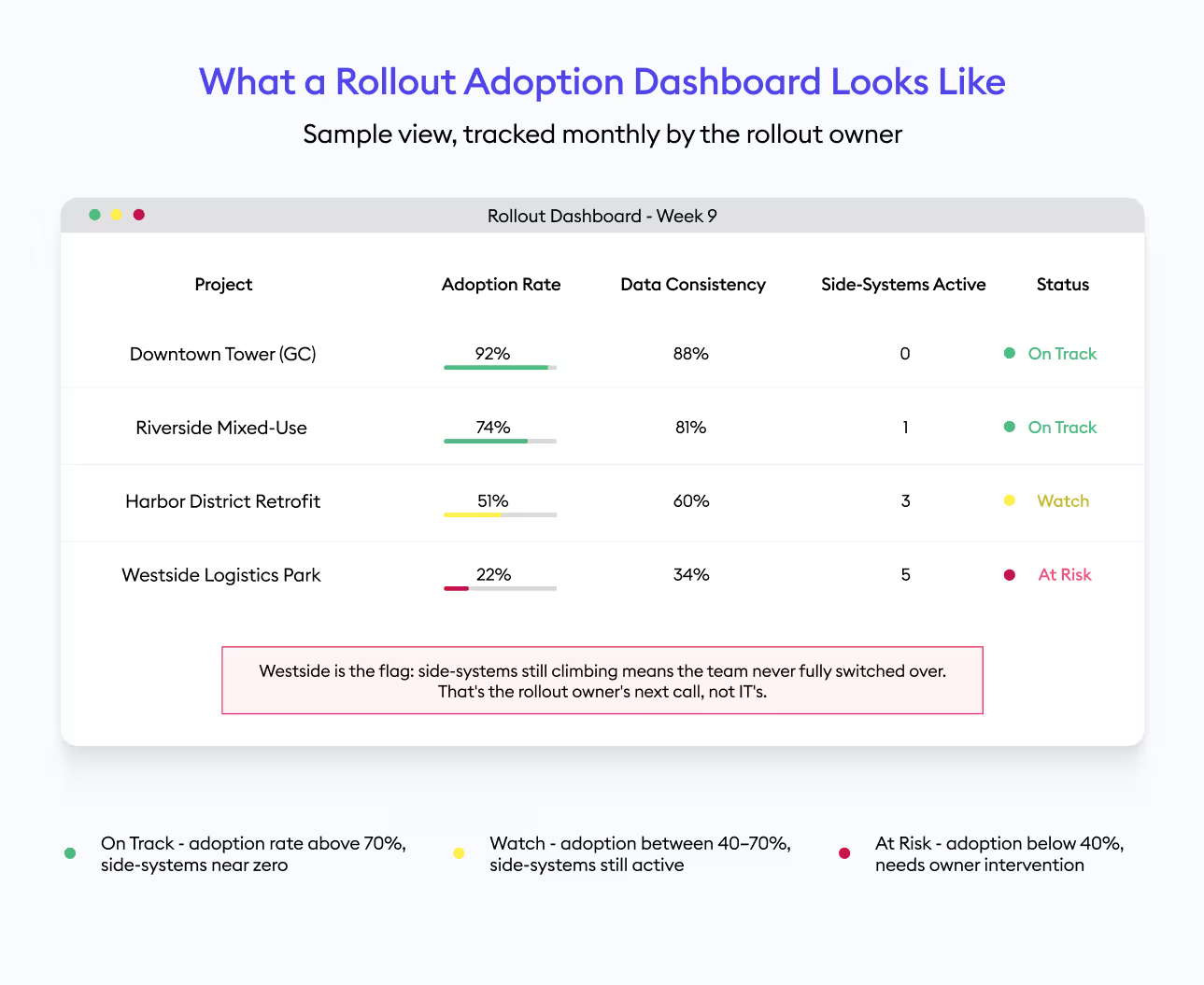
Track these four metrics on a recurring basis, ideally monthly, so leadership can see momentum or stalling in real time.
- Adoption rate: the share of active project teams using the platform for their primary workflow, not just logging in occasionally
- Data consistency: the share of records following naming conventions and required fields, checked during monthly audits
- Side-system reduction: the number of parallel spreadsheets, shared drives, or paper logs still active on a project
- Time saved: hours per week reclaimed from non-optimal activities like searching for project data, benchmarked against a pre-rollout baseline
Report these numbers the way you already report safety or schedule. What gets measured on a recurring dashboard gets protected when the next busy season hits.
Turning Metrics Into a Simple Dashboard
A usable adoption dashboard fits on one page. List each active project, its adoption rate, its data consistency score, and any side systems still in use next to it.
Review it in the same meeting where the schedule and budget get reviewed. Adoption that only gets discussed separately gets deprioritized the moment a real deadline shows up.
Share the dashboard with champions too, not just leadership. Champions who can see their own project's numbers tend to push harder to improve them.
What Good Adoption Actually Looks Like
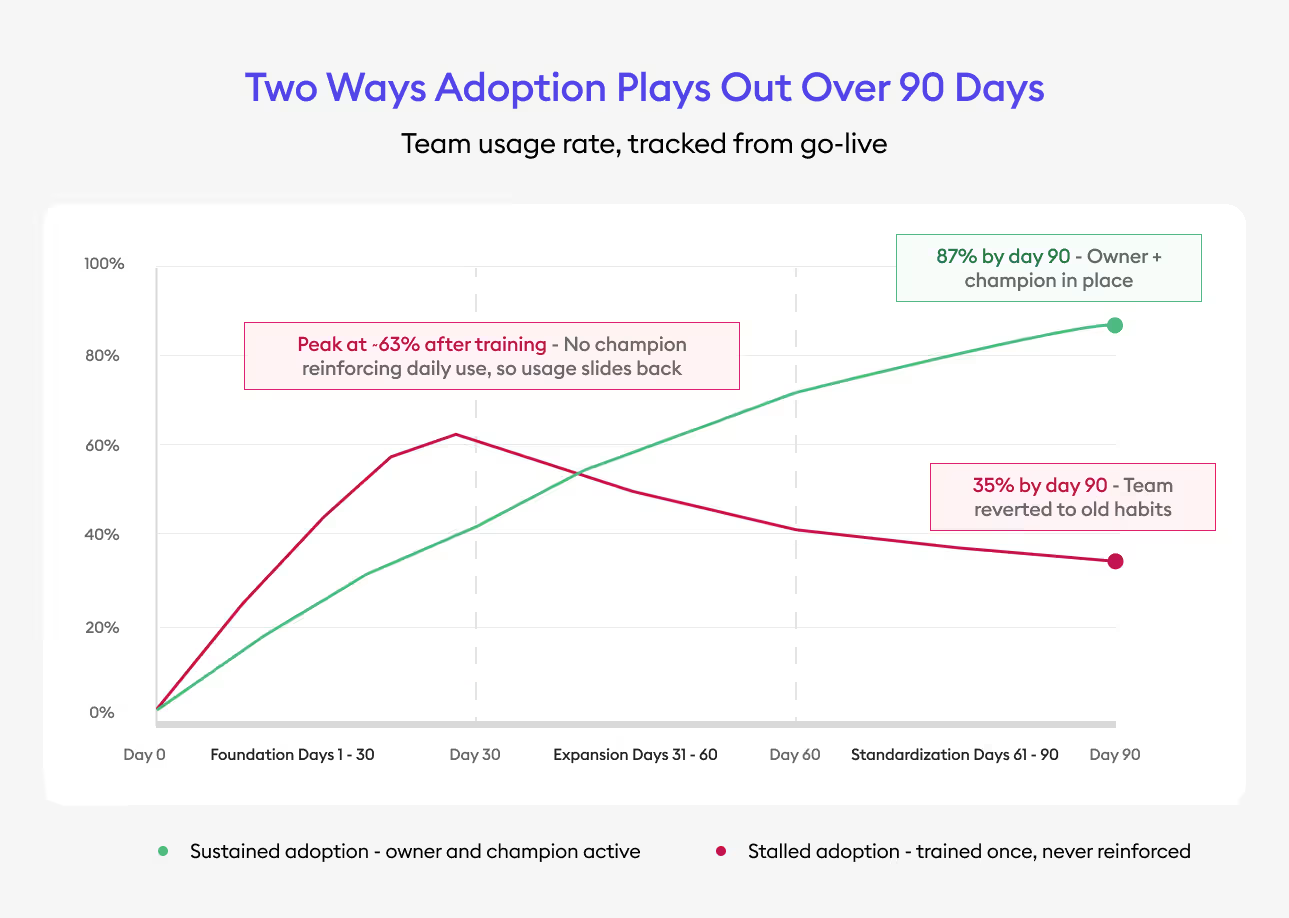
Strong adoption rarely means 100 percent usage in month one. It means a steady climb, phase over phase, with side systems shrinking and consistency scores rising each month.
Flat or declining adoption after 60 days is the clearest early warning sign that a rollout needs intervention, not more patience.
Turning Onboarding Into ROI
Even a well-designed software implementation plan needs support to become a habit. That is where onboarding quality and an internal owner meet.
Businesses that use well-organized onboarding strategies with one person responsible for ensuring implementation tend to achieve a faster ROI. Having someone responsible for linking the purchase to practice helps.
This is the piece platforms like Beam AI put real support behind: helping estimators and project teams standardize takeoff and estimating workflows during onboarding, not after the first support ticket. The tool matters less than whether a team actually owns making it stick. That combination of standardized workflows and real onboarding support is how finishes contractor G.W. Thiel went from 3–5 day takeoffs to 30–40% higher business growth without adding headcount.
The vendor onboarding process helps to establish the groundwork stage but does not take on the owner's or champion's role. The vendor organizes the process while the owner is responsible for implementing it afterward.
The firms that get the best return treat onboarding as the start of implementation, not the whole plan. They keep running their own 30-60-90-day tracking long after the vendor's kickoff calls end.
Wrapping It Up
Construction software adoption fails when nobody owns the transition, and nobody defines what working actually looks like. Adoption sticks when firms name an owner, develop a software champion, standardize workflows, and track metrics from day one.
The platforms that succeed on a jobsite are rarely the most powerful ones on the market. They are the ones a team actually implements with a real plan behind them.
Start small if you need to. Name one owner, pick one champion, and run one 30-60-90-day cycle on a single project before scaling across the company.
The firms that treat adoption as a discipline, not a launch event, are the ones that stop losing money to rework, bad data, and tools nobody actually uses.




.jpg)