





The Growing Pressure on Construction Estimating Teams
If you ask estimators, product managers or even GCs what they’re spending the most of their time on, the answer is predictable: arriving at a number quick enough to still be relevant. The demand for more accurate bids on tight deadlines is a growing one and the more reliance there is on manual input to the bid process, the more challenging that demand can become.
That's exactly the problem Beam AI was designed to solve.
Built for contractors, estimators, project managers, and owners, Beam AI combines artificial intelligence, cloud collaboration, cost estimation, and project tracking into a single platform. Instead of treating estimating as an isolated task, it connects the entire workflow - from drawing review and quantity takeoffs to budgeting, reporting, and project visibility.
Why Construction Teams Are Moving Toward AI-Powered Estimation
For decades, construction estimating followed a familiar process.
An estimator received a set of drawings, manually counted building elements, measured quantities, entered values into spreadsheets, calculated labor and material costs, and then shared the results with the broader team.
The process worked, but it was slow. As project complexity increased and bid timelines shortened, many firms discovered that manual workflows were becoming a competitive disadvantage.
Today, AI estimation software like Beam AI helps teams:
- Complete takeoffs faster
- Reduce human counting errors
- Standardize estimating processes
- Improve collaboration
- Respond to bid opportunities more quickly
- Gain better cost visibility throughout preconstruction
Rather than replacing estimators, modern construction AI tools help them focus on higher-value activities such as scope review, risk analysis, and strategic decision-making.
What is Beam AI: Features and Core Capabilities
The rise of AI in construction has moved past rapid takeoff and toward establishing smarter, more integrated workflows.
AI takeoff and estimating software, such as Beam AI, combines takeoff, estimating, tracking, and collaboration into a unified platform and allows teams to reduce their time spent doing manual work while improving accuracy and decision-making during preconstruction.
Now, let's explore the core features that make Beam AI stand out:
AI-Powered Takeoffs
One of the most valuable capabilities within Beam AI is automated quantity takeoff generation.
The platform can identify walls, doors, windows, rooms and other building components directly from PDFs, CAD files, and construction drawings. Instead of manually counting hundreds or thousands of objects, AI performs the initial detection automatically.
This significantly reduces repetitive work while allowing estimators to review and validate results before finalizing quantities. The impact goes beyond speed, helping teams turn bids around faster, reduce manual counting effort, maintain greater consistency across projects, and ease the workload on estimators, ultimately reducing burnout during busy bidding periods.
Cost Estimation
Once quantities are generated, Beam AI converts those quantities into detailed cost estimates.
It combines material pricing, labor rates, assemblies and project-specific cost factors to create comprehensive estimates that can be adjusted as project requirements evolve. Rather than jumping between multiple systems, your quantity and cost data remain connected.
By automating routine estimating tasks, teams can spend less time compiling numbers and more time evaluating the factors that impact project costs. This results in faster budget creation, better visibility into cost drivers, and greater confidence when exploring different pricing scenarios or assessing project risks.
Collaboration Tools
Creating an estimate is rarely a one-person job. Once quantities and costs start coming together, you'll likely need input from project managers, executives, subcontractors, clients, or other stakeholders before a bid is finalized. That's where communication can either keep a project moving or slow it down.
Beam AI brings everyone into the same centralized workspace, giving teams access to the latest project information at all times. Team members can leave comments, review markups, track revisions, and collaborate in real time, ensuring that everyone is working from the same set of data.
As a result, you spend less time managing communication and more time moving bids through the review process with confidence, resulting in fewer misunderstandings, stronger accountability across teams, and faster decision-making when deadlines are tight.
Project Tracking
Once a project moves into execution, the real test is whether the assumptions made during estimating hold up in the field.
That's why Beam AI doesn't stop at preconstruction. It helps you maintain visibility throughout the project lifecycle by tracking budgets, schedules, progress, and performance metrics in one place. So, instead of waiting until the end of a project to understand what went right or wrong, you can compare projected costs against actual outcomes as work progresses.
This gives you the opportunity to identify potential issues early, adjust course when necessary and make decisions based on real-time information rather than hindsight. Over time, this level of visibility leads to stronger forecasting, better financial control, and a more predictable project delivery process.
Custom Templates
If you've been estimating for any length of time, you know that many projects share similar scopes, workflows and cost structures. Yet teams often find themselves rebuilding estimates from scratch, repeating work they've already done dozens of times before.
Beam AI eliminates that inefficiency with customizable templates designed for how your business operates. Whether you’re regularly bidding multifamily housing, healthcare facilities, schools, warehouses, or commercial office spaces, you can build standardized estimating frameworks that align with your processes and pricing structures. Instead of starting from a blank page every time, you start with a proven foundation that your team already believes in.
The benefits extend beyond saving time. Standardized templates help create consistency across projects, improve estimate accuracy, and make it easier for new team members to get up to speed. As your business grows, this also helps ensure that best practices are applied consistently, regardless of who is building the estimate.
Cloud-Based Access
Unlike traditional desktop software, Beam AI operates entirely in the cloud. You can access projects from the office, a job site, a home office, or while traveling.
Because project data is stored and managed in a centralized cloud environment, your team can stay connected regardless of location. Whether you're expanding your estimating department, collaborating across multiple offices, or supporting remote team members, everyone has access to the same up-to-date information.
Cloud delivery also means teams can scale efficiently without the management and version-control issues that often come with traditional desktop solutions, as software improvements and new features are automatically available.
BIM Integration
Building Information Modeling (BIM) has become an important part of modern construction workflows, helping teams coordinate designs, reduce clashes, and improve project planning long before construction begins.
Beam AI supports BIM-driven workflows by helping teams connect model-based project information with estimating and preconstruction activities. This allows estimators, project managers, and stakeholders to work from more coordinated project data while improving visibility across the planning process.
For firms already investing in BIM, this creates a stronger connection between design information and project costs, helping teams make more informed decisions earlier in the project lifecycle.
Analytics and Reporting
As your business grows, making decisions based on estimates alone is no longer enough. You need visibility into performance, trends, and outcomes across projects.
Beam AI provides analytics and reporting tools that help you track key metrics, review project data, maintain audit trails, and generate reports for stakeholders.
By turning project information into actionable insights, the platform helps teams improve accountability, simplify project reviews, support executive reporting, and make smarter decisions over time.
Who Is Beam AI Built For?
The challenges may vary by role, but most construction teams are essentially trying to solve the same problem: faster delivery of accurate information with less manual effort. Beam AI helps fill those gaps by enabling the people who are involved in every step of the project lifecycle.
General Contractors
The difference between winning and losing for general contractors can come down to speed and accuracy. When bid deadlines are tight and opportunities are plentiful, days spent on manual takeoffs can limit the number of projects your team can pursue. Beam AI helps contractors respond faster, bid more jobs and increase productivity without adding staff by reducing take-off time by up to 90%.
Estimators
Estimators are the backbone of any successful project, but much of their time is spent in repetitive counting and measuring activities. Beam AI automates these time-consuming activities and frees estimators to focus on scope analysis, pricing strategy, risk evaluation, and bid quality areas where their expertise delivers the most value.
Project Managers
Once the project is beyond the estimation stage, visibility becomes critical. Project Managers require the latest budget and performance data to monitor the performance of the projects and take action in a timely manner. With real-time dashboards and centralized project information, Beam AI provides a clearer view of costs, schedules and progress, helping teams make faster and more informed decisions.
Owners and Developers
For owners and developers, every major decision depends on reliable project data. Beam AI ensures you have more clarity over project costs and timeline, helping you more easily vet opportunities, budget and make strategic investment decisions far before ground even breaks.
How Beam AI Works: The Six-Step Workflow
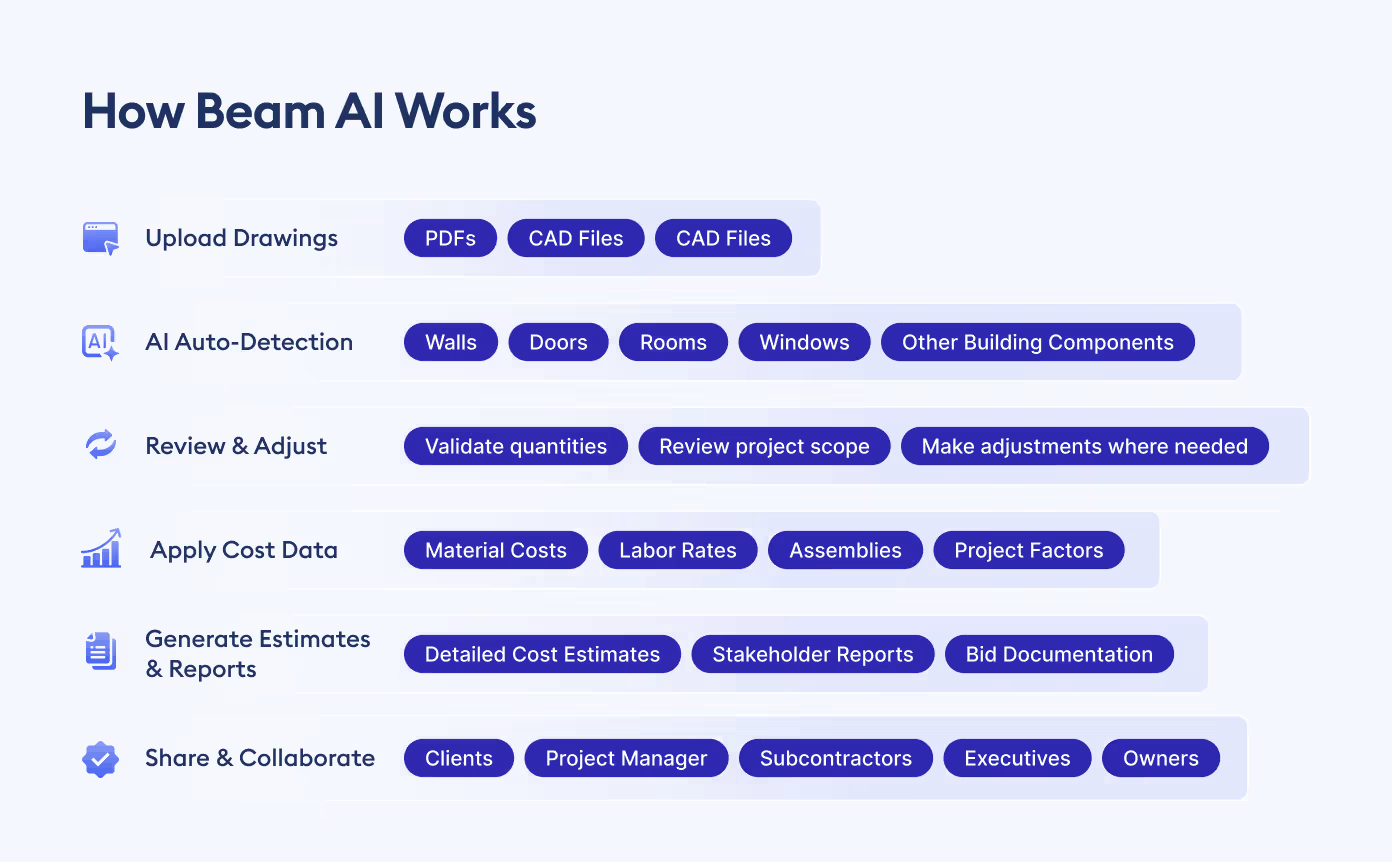
The best way to understand Beam AI is to follow the estimating process from start to finish. While the platform automates many of the most time-consuming tasks, it still keeps estimators in control at every stage.
Step 1: Upload Drawings
It starts by uploading project documents, be they PDFs, CAD files, or image-based plans. Beam AI then generates drawings for analysis and quantity extraction.
Step 2: AI Auto-Detection
Beam AI automatically scans the drawings and detects key building elements such as walls, rooms, doors, windows, and other project components. It then generates initial quantities, eliminating much of the manual counting typically required during takeoff.
Step 3: Review and Adjust
While AI handles the heavy lifting, human expertise remains just as essential. Estimators can review the detected quantities, make adjustments where needed and ensure the results accurately reflect project scope and requirements.
Step 4: Apply Cost Data
Now that quantities have been confirmed, material costs, labor rates, assemblies, and other pricing can be introduced, and raw quantities become actual pricing to determine project costs.
Step 5: Generate Estimates and Reports
With the estimate complete, Beam AI creates detailed reports and supporting documentation that can be used for internal reviews, bid submissions and stakeholder discussions.
Step 6: Share With Teams and Clients
The final estimate can then be shared with team members, clients, subcontractors, or project stakeholders for review and approval. Because everything is stored within a centralized platform, collaboration also remains simple and transparent throughout the process.
From the moment drawings are uploaded to the final estimate review, Beam AI helps streamline every step of the workflow, keeping your team firmly in control of the decisions that matter most.
Beam AI for Specialty Trades
While general contractors benefit from faster estimating workflows, specialty contractors often face an even greater challenge. HVAC and plumbing projects contain hundreds of components, assemblies, and systems that can take days to quantify manually.
Beam AI offers both DIY and DFY (Done-For-You) estimating options for trade contractors who want to accelerate takeoffs without sacrificing accuracy.
For HVAC contractors, Beam AI can generate AI-assisted takeoffs in as little as 10 minutes while achieving up to 90% feature-capture accuracy on supported drawings. This allows estimating teams to spend less time measuring ductwork, equipment, and fittings and more time refining pricing and winning work.
The same advantages apply to plumbing contractors. Instead of manually counting fixtures, piping systems, and accessories, teams can leverage AI-powered quantity extraction to accelerate bid preparation and improve consistency across projects.
Beam AI vs Other Construction Specific Tools
The rise of AI in construction has given contractors and estimators more choices than ever before. However, not every platform resolves the same issues or offers the same benefits of increased takeoff speed and enhanced efficiency. Some limit themselves to just quantity extraction, while others try to provide services for wider estimating and project workflows.
So, it's hard to compare features and tell the whole story. But the bigger question is, how well a platform integrates with your team's way of working, whether they are reviewing drawings, creating estimates, working with stakeholders, or monitoring project performance over time.
The tables below provide a side-by-side comparison of Beam AI and several well-known construction technology platforms to help you understand where each solution excels.
Comparison Table
Feature Matrix
Beam AI vs Togal.AI
When conversations turn to AI-powered takeoffs, Togal.AI is often one of the first platforms mentioned. It has built a strong reputation for automating quantity extraction and helping estimators reduce the time spent measuring plans.
Beam AI offers many of those same advantages, but the workflow doesn't end once quantities have been generated. Teams can continue working within the same environment to estimate costs, collaborate with stakeholders, track projects, and generate reports. For firms looking to connect more of the preconstruction process, that broader functionality can make a meaningful difference.
Beam AI vs PlanSwift
For a lot of construction pros, PlanSwift has been part of the estimating conversation for years. Its age and familiarity have made it a trusted alternative for countless estimators.
The construction teams, meanwhile, have also changed their work. It is becoming increasingly important to work together remotely, access the cloud and see projects unfold in real time. Beam AI was created with these new expectations in mind so that teams could work on projects, collaborate and manage information without being tied to a machine or a location.
Beam AI vs CostX
CostX has long been a favourite for quantity surveyors and firms who work heavily with BIM-based workflows. Its features are robust and very detailed, especially for organizations with complex estimating needs.
Beam AI takes a different approach to the problem. The focus is on reducing complexity and getting teams productive fast. It’s a simplified experience that can reduce onboarding and accelerate the everyday estimating activities for contractors who care about speed, accessibility and ease of adoption.
Beam AI vs Kreo
While Kreo shares many similarities with Beam AI and represents another modern entrant in AI estimating. As newer AI-driven estimating platforms enter the market, Kreo has emerged as another option for contractors exploring automation. Like Beam AI, it focuses on cloud-based workflows and AI-assisted takeoffs.
Many users notice a difference in how the overall workflow feels. Beam AI believes in keeping it simple so teams can get from drawings to estimates and project collaboration without the needless complexity.
For growing organizations, this ease of use can play a significant role in long-term adoption.
Beam AI vs ProEst
ProEst combines estimating and project management capabilities, making it a familiar name for many contractors evaluating digital construction tools.
Beam AI builds on that concept by introducing deeper AI-driven automation into the estimating process. By reducing manual effort during takeoffs and creating a more connected workflow, the platform helps teams spend less time on repetitive tasks and more time evaluating project opportunities and risks.
What Makes Beam AI Different?
After comparing the market, a clear pattern begins to emerge. Many construction technology platforms solve one part of the estimating process extremely well. The challenge is that estimating rarely exists in isolation.
A takeoff eventually becomes an estimate. An estimate becomes a budget. A budget becomes a project that requires coordination, tracking, reporting and ongoing visibility. Beam AI was designed with that entire journey in mind.
End-to-End Workflow Coverage
Many tools focus primarily on generating quantities. Beam AI takes that first step so much further, allowing teams to flow easily from takeoffs to estimating, collaboration, project tracking and reporting, all without having to jump between platforms all the time.
AI That Learns From Corrections
No AI system is perfect, so estimator expertise is still needed. Teams look at the results and make adjustments, so Beam AI is always learning from those corrections. With time, this helps to build more efficient workflows that better match project requirements and company standards.
Collaboration-First Design
The estimator is only one of many people involved in construction projects. Often, project managers, executives, subcontractors, and clients need the same information. Beam AI was built with shared workspaces, making collaboration part of the workflow, not an afterthought.
Browser-Based Accessibility
Not every modern construction team is in the same office. Beam AI makes projects accessible from laptops, tablets and mobile devices, keeping teams connected wherever they are - at headquarters, on-site or working remotely.
Modern User Experience
Software adoption often succeeds or fails based on how quickly teams can start using it effectively. Because Beam AI was designed around modern workflows, many users find the learning curve shorter and the transition smoother than with legacy systems developed decades ago.
Real-World Use Cases
The benefits of AI-powered estimating become much clearer when you look at how contractors are using the technology in the real world. Across different trades and company sizes, a common theme emerges - teams spend less time on manual takeoffs and more time pursuing opportunities, refining estimates, and growing the business.
Pilkington Construction Turns Time Savings into Business Growth
Before adopting Beam AI, Pilkington Construction relied on manual takeoffs using traditional estimating tools where a single project takeoff often took 3 - 4 days, limiting the number of bids the team could pursue and leaving little time for scope review or subcontractor coordination.
After Beam AI, the team reduced takeoff time dramatically that saved up to a full week per project and doubled its bidding capacity. The increased efficiency helped the team achieve 1.5X business growth without adding headcount, allowing estimators to focus on higher-value activities instead of repetitive quantity extraction.
Team HB Doubled Bid Output Without Expanding the Team
For Team HB, lengthy takeoffs were creating a bottleneck in the bidding process. Estimators spent several days completing takeoffs that slowed bid turnaround and reduced the number of opportunities the company could pursue. Valuable time that could have been spent reviewing bids and developing strategies was consumed by manual measurement work.
With Beam AI automating much of the takeoff process, the team began saving several days on every project. Those time savings translated directly into business results, helping Team HB double its bid output and respond to opportunities much faster without increasing staffing levels.
Carolina Site Utilities Wins More Work Through Faster Estimating
Carolina Site Utilities faced a challenge familiar to many growing contractors. Estimators were spending one to two weeks on takeoffs, and frequent plan revisions created additional rework that slowed turnaround times and caused missed bidding opportunities. The team wanted to spend more time refining proposals and working with vendors, but found themselves buried in manual calculations.
After adopting Beam AI, takeoff times dropped by 24 - 48 hours per project. The team was able to increase bid volume, improve win rates, and focus more attention on pricing strategy and proposal quality, unlocking significant growth potential without requiring additional estimators.
Honest Strengths and Limitations
No construction software solves all problems and Beam AI is no different. The most successful implementations are those in which teams understand not only the strengths of the platform but also the realities of working with AI-assisted estimating tools.
Automation can go a long way toward reducing manual effort, but estimator oversight or a human-in-the-loop is still required as drawing quality still matters for results, which may require organizations to adjust existing workflows. These are not limitations specific to an AI tool, but are considerations for almost all modern AI estimating platforms.
The best results are often achieved when AI manages repetitive tasks and experienced professionals are left to focus on validation, decision-making, and project strategy.
Who Should Choose Beam AI?
The answer depends less on company size and more on how your team prefers to work.
Beam AI is often a natural fit for organizations that value collaboration, cloud access, scalability, and quicker bid turnaround. The platform especially fits contractors that are expanding, design-build firms, and teams handling a larger volume of projects, where the efficiency gains can be substantial.
At the same time, every business has unique requirements. Firms that operate entirely as solo estimators, depend heavily on niche legacy integrations, or require highly specialized workflows, may find that other solutions fit their needs more closely.
Ultimately, the best choice is the one that supports your processes today while giving your team room to grow tomorrow.
How to Get Started With Beam AI
Adopting new technology often sounds more disruptive than it actually is. In reality, most teams begin seeing value once they start working with their own projects and data.
The procedure typically begins with a demonstration where the stakeholders get to observe how the platform integrates with their current workflows. Then, many contractors upload a sample project and assess how Beam AI meets their unique estimating needs.
Once confidence has been gained, teams can start training users, pilot projects, and validate results with existing processes. The platform is easy to use, so many users adapt to its basic functionality within a few hours.
Once the pilot phase proves successful, scaling usage across estimating, project management, and preconstruction teams becomes a much more straightforward step.
Conclusion
If you're researching Beam AI, it's important to view it as more than a takeoff tool.
At its core, the platform brings together AI-powered quantity extraction, cost estimation, collaboration, project tracking, and reporting within a single cloud-based environment. The goal isn't simply to help estimators work faster but to create a more connected and efficient preconstruction process from start to finish.
As construction continues to embrace digital transformation, firms are looking for ways to eliminate repetitive work, improve visibility, and make decisions with greater confidence. Beam AI addresses those needs by connecting workflows that have traditionally been fragmented across multiple systems.
For contractors, estimators, project managers, and owners alike, that connection may ultimately be where the greatest value lies.