


How Is Takeoff Data Protected in the Cloud?
Cloud-based systems protect takeoff data through encryption, access controls, multi-factor authentication, activity monitoring, and backups. These security measures help keep drawings, estimates, and project files protected from unauthorized access and data loss.
Construction drawings, bid numbers, specifications, and takeoff files may look like ordinary PDFs and spreadsheets, but they can contain information a company would not want sitting in the wrong hands.
Project drawings can contain information protected by an NDA, while bids may reveal material quantities, pricing, and other details a company considers confidential.
Projects in sectors such as healthcare or government may also have specific compliance requirements.
If an estimator loses these files, the impact can go beyond lost data—it can mean redoing hours of work, missing a bid deadline, or exposing information to the wrong people.
That is why cloud-based systems need more than a login screen to protect construction data.
Good cloud platforms combine encryption, access controls, backups, secure infrastructure, monitoring, and recovery processes to reduce the risks that come with storing and sharing project files online.
Why Is Construction Data Security Important?
Takeoff data contains more than measurements. A project workspace may include architectural plans, structural drawings, MEP plans, specifications, addenda, material quantities, bid documents, estimates, and notes. In many cases, these files are confidential or commercially sensitive.
For healthcare projects, teams should also check whether the cloud-based system supports HIPAA requirements when project files contain protected health information (PHI).
A subcontractor’s takeoff can give away the quantities planned for a job, while an estimate can contain pricing and margin details.
If those files fall into the wrong hands, the company could end up exposing information it intended to keep private.
This is why construction data security should be considered when selecting takeoff or estimating software, rather than treated as an IT issue that comes later.
Beam AI's security practices explain its SOC 2 Type II certification and the security controls used to protect client data.
What Are the 6 Pillars of Cloud Security?
The six common pillars of cloud security are identity and access management, data security, application security, infrastructure security, monitoring and logging, and backup and disaster recovery.
- Identity and Access Management (IAM): Controls who can sign in and which project files or systems they can use.
- Data Security: Protects drawings, takeoffs, estimates, and other project information from unauthorized access or loss.
- Application Security: Helps keep the software itself protected from security weaknesses and unauthorized use.
- Infrastructure Security: Protects the servers, networks, storage, and other equipment behind the cloud service.
- Monitoring and Logging: Records important activity so teams can see who accessed, changed, or downloaded files.
- Backup and Disaster Recovery: Keeps extra copies of project files and helps restore them if something is lost or a system goes down.
How Do You Protect Data Stored in the Cloud?
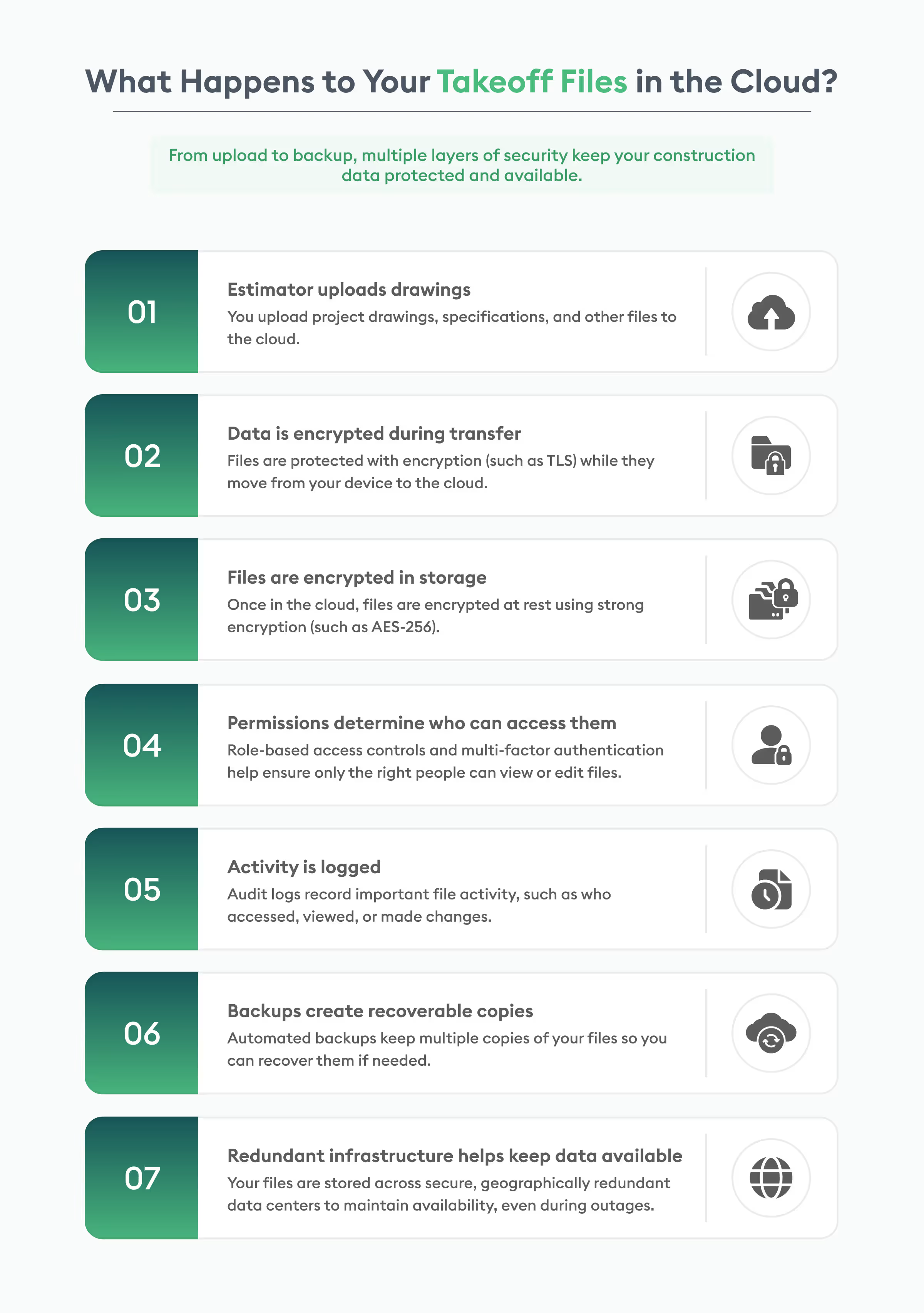
- Use encryption: Protect data while it is stored and transferred.
- Enable MFA: Add another layer of protection beyond passwords.
- Control access: Give users access only to the files and information they need.
- Monitor activity: Use audit logs to track file access, changes, and downloads.
- Back up data: Keep recoverable copies of important project files.
- Use secure infrastructure: Choose providers with strong security controls and regular testing.
How Does Cloud Encryption Protect Takeoff Data?
One of the first safeguards to look for in cloud takeoff data security is encryption. There are two situations to consider: when data is moving and when it is stored.
What Is Encryption in Transit?
Every time an estimator uploads a drawing or downloads a completed takeoff, the file passes between the user's device and the cloud platform. Encryption in transit, such as TLS, keeps that connection protected.
This matters because files can be exposed while they are moving between systems if the connection is not properly secured. TLS makes the transferred data unreadable to outsiders and helps prevent changes to the file during the transfer. AWS also recommends TLS for securing data sent across networks.
What Is Encryption at Rest?
Once a drawing or estimate reaches cloud storage, it needs protection there as well. Encryption at rest protects files while they are sitting on storage systems or backup media.
Cloud providers commonly use AES-based encryption for stored data. Google Cloud, for example, uses AES-256 at the storage layer for customer data at rest.
There is another part of the equation that is easy to overlook: encryption keys. Strong cloud architectures keep keys under separate controls from the data they protect. That way, gaining access to a storage layer alone does not automatically provide the keys needed to decrypt the files.
In simple terms:
In transit: protects the file while it is moving.
At rest: protects the file while it is stored.
Key management: controls who or what can unlock the encrypted data.
Together, these controls form an important part of takeoff software data protection.
How Do Cloud Systems Control Access to Project Files?
Encryption does not solve every security problem. Someone who is legitimately logged into an account can still access information they should not see if permissions are too broad.
That is where identity and access controls come in.
Multi-factor authentication
Multi-factor authentication, or MFA, requires something beyond a password to verify a user's identity. This might be an authenticator app, security key, or another verification method.
The additional step matters because a stolen password alone is not enough to complete the login. CISA recommends MFA as a key protection against unauthorized access.
Role-based access
Role-based access control limits what users can do based on their responsibilities.
For example, an estimator may need access to drawings and takeoff files, while a project manager may need broader project information. A subcontractor invited to review part of a project should not automatically have access to every bid or internal cost document.
The principle is straightforward: people should have access to the information they need, not everything stored in the system.
Activity and audit logs
Cloud-based systems can add another layer of accountability through audit logs. Depending on the platform, these logs can record actions such as logins, file access, changes, downloads, and administrative activity.
Cloud platforms use these records to investigate unusual activity and understand who performed an action.
Google Cloud, for example, generates audit logs for administrative and access activities.
For an estimating team, that creates a useful record when a project file is changed, shared, or accessed.
How Are Cloud Takeoff Files Backed Up?
Picture an estimator's laptop failing just before a bid deadline. After days of measuring drawings, sorting quantities, and working through the estimate, losing the files could mean having to start over.
Construction file backup helps avoid this problem by keeping copies of project data separate from the estimator's computer.
Cloud based systems can use automatic backups, redundant storage, and disaster recovery measures to keep data available when something goes wrong. Some also store copies in different geographic locations, so an outage at one site does not wipe out every copy of the data. Microsoft and Google both use geographic redundancy as part of their cloud storage and recovery approaches.
The important distinction is that backup and disaster recovery are not exactly the same thing:
- Backup creates recoverable copies of data.
- Redundancy keeps additional copies in different systems or locations.
- Disaster recovery provides a plan for restoring services and data after a serious failure.
For estimators, the practical benefit is simple: a damaged laptop, failed drive, or local hardware problem does not have to mean starting a takeoff from scratch.
How Does Cloud Infrastructure Protect Data?
Security does not stop at software. The infrastructure hosting the files matters too. Cloud-based systems rely on data centers with multiple physical security controls to help protect the infrastructure where project files are stored.
These can include restricted access, cameras, security personnel, biometric identification, alarms, and other measures designed to prevent unauthorized physical access to servers.
Cloud providers also invest heavily in monitoring, vulnerability management, system updates, and incident response. That is one reason cloud construction software security can be stronger than relying entirely on a small company's own local hardware and IT setup.
This does not mean every cloud product is equally secure. The security of the application, its configuration, the provider's policies, and the customer's own account practices all matter.
SOC 2 and ISO 27001: What Do They Actually Mean?
Security certifications and independent assessments can help buyers separate documented controls from vague claims.
SOC 2 is an examination that evaluates controls relevant to areas such as security, availability, processing integrity, confidentiality, and privacy. For cloud-based systems, a SOC 2 report gives customers assurance about how a service organization manages those controls.
ISO/IEC 27001 is an international standard for information security management systems. It focuses on how an organization identifies security risks, puts controls in place, and continually manages and improves its information security program.
These are not simply badges to place on a website. When evaluating SOC 2 construction software, buyers should ask what was assessed, what type of report or certification exists, and whether it is current.
Is Cloud Storage Safer Than Local Storage?
The question is not simply whether the cloud is safer than a laptop. It is about who is responsible for maintaining the security controls.
A local computer gives an estimator direct control over the machine, but that machine can be lost, stolen, damaged, infected, or simply fail.
A shared drive may provide better collaboration, but its protection still depends on how access, backups, permissions, and monitoring are configured.
A managed cloud platform can centralize many of these controls, including identity management, encrypted storage, backups, monitoring, and recovery.
That is one reason cloud-based takeoff software can make sense for teams handling large drawing sets and sensitive bids across multiple locations.
Beam AI's cloud-based takeoff software guide also compares cloud and on-premise workflows, including collaboration, access, maintenance, and security considerations.
How Do You Choose Secure Takeoff Software?
Before moving project files to a new platform, ask a few direct questions.
Is data encrypted in transit and at rest?
Find out which encryption methods are used and how encryption keys are managed.
Does the platform support MFA and role-based access?
You should be able to control who can access project information.
What security certifications or assessments do you have?
Ask about SOC 2 Type II, ISO 27001, or other relevant independent assessments.
Where is my data stored?
Check server locations and whether the provider offers data residency options that meet your company's requirements.
Who can access my files internally?
Ask how employee and administrator access is restricted and monitored.
How are backups handled?
Find out how frequently backups are created, where they are stored, and how restoration works.
What happens during an outage?
Ask about the provider's disaster recovery process, recovery targets, and testing.
A vendor that can answer these questions clearly gives you a much better basis for evaluating its cloud-based estimating software.
The Bottom Line
Cloud storage does not make construction data automatically secure. The protection comes from the controls built around that storage.
Encryption protects files while they move and while they sit in storage. MFA and role-based permissions reduce unauthorized access. Audit logs provide visibility into account activity.
Backups and geographic redundancy help protect against hardware failures and larger outages. Secure data centers, vulnerability testing, and independent assessments add further layers.
For estimating teams, that matters because drawings, takeoffs, bids, and project files are valuable business information. Choosing cloud-based systems with documented security practices can reduce the risks that come with keeping all of that information on individual devices or unmanaged storage.
For a closer look at how cloud tools fit into modern estimating workflows, see Beam AI's guide to cloud-based takeoff software for remote construction teams.



.jpg)