





What Is a Construction Bid Tracking Dashboard?
A bid tracking dashboard is a shared workspace for monitoring bids from invitation through submission. Open a project record, and you should find its bid deadline, assigned estimator, current documents, addenda, and requests for information (RFIs). It also shows what is holding up the bid, such as a supplier quote that has not arrived or a clarification awaiting an answer.
How RFIs and Addenda Affect Bid Deadlines and Pricing
A supplier may have priced equipment that has since been replaced in an addendum. The new drawing is in the folder, but somebody still has to obtain and review another quote. Keeping the addendum under the project record, with an “awaiting price” status and a named estimator, makes that work visible before approval.
That quote needs checking against the latest bid documents before it becomes a part of the estimate. An unanswered RFI may leave you unsure what to price, while a missed addendum acknowledgment could affect whether the bid is accepted. The bid instructions spell out what’s required. Federal rules allow certain minor informalities to be corrected or waived. That being said, they don’t provide a general right to fix a bid after submission.
Common Bid Tracking Problems with Email and Spreadsheets
When updates live in different places, the estimator has to do the work of connecting them. A calendar entry says Friday. A spreadsheet says Thursday. The email explaining the extension is in a colleague’s inbox. None of these records is especially difficult to update on its own, which is why the duplication can seem manageable until several bids are due in the same week.
- Email overload: A revised drawing arrives in the same thread as routine pricing questions. If a clear notice of the change is not mentioned or specified, chances are, it may never reach the person updating the estimate.
- Manual spreadsheet errors: Correcting a mistyped deadline in the shared file won’t update the copy an estimator downloaded earlier.
- Siloed communication: The estimator who took a call knows why the scope changed. The person reviewing the price or taking over the project after the award may have no written record of it.
Someone has to make time for these checks, even when the office is short-staffed. Hiring help may be difficult, too: the 2026 AGC and Sage outlook found that 80% of respondents struggled to fill salaried positions, a category broader than estimating alone. The people preparing bids may also be the ones digging through emails to confirm a deadline or work out which version of the bid list is current.
Top 3 Ways to Track Bids: Bid Boards vs. Construction Suites vs. CRM
A subcontractor might quote one project to three GCs. Each invitation needs its own contact and quote deadline, even though the drawings may be the same. A GC’s dashboard, meanwhile, has to show which trades have returned prices and how those bids compare.
You can manage this work with a dedicated bid board, use the bidding tools in an existing construction platform, or build a custom view around CRM records. The choice depends on where your team needs help in its estimating workflow.
Dedicated Bid Boards (Beam AI, BuildingConnected, PlanHub, Downtobid)
A bid board gives each invitation a place to track the estimator, deadline, questions, and drawing changes. If you’re copying these details from emails into a spreadsheet, test how much the software can import and what still needs manual entry.
- Beam AI: The Bid Dashboard captures invitations to bid (ITBs) from email. The team can record who is handling each bid and when it is due. RFIs and addenda stay with the project, with custom statuses and reminders for tracking the remaining work.
- BuildingConnected: GCs use BuildingConnected Pro to issue invitations, communicate with subcontractors, and compare bids. The subcontractor product, Bid Board Pro, organizes received invitations and estimating assignments. They serve different sides of the bidding process.
- PlanHub: Bidders can access project files and communications together. Its document-update process lets the person uploading a revision choose whether to send an email notification, so an upload should not be assumed to trigger an alert every time.
- Downtobid: Invitations and later updates, including addenda, sit together on its bid board. Email intake and calendar handling are the points to test with your own invitations.
For a useful demo, bring an invitation your team has already handled and the addenda issued with it. Ask the vendor to show where a date change appears and how the estimator would know a quote needs revising. You can compare that process with the steps your team took on the actual bid.
All-in-One Construction Platforms (Procore, Fieldwire)
The people running an awarded job need access to the decisions made during estimating. A construction suite can keep the priced drawings and accepted clarifications available after the handoff, along with exclusions and the basis for allowances. For a mid-to-large GC already using the platform, that continuity may be a good reason to use its bidding tools as well.
Procore Bid Management supports coordination among estimators, bidders, and project teams. Its drawing tools also let users create or link RFIs on a sheet. Someone reviewing a question can see where it applies instead of working from the email description alone.
Fieldwire offers RFI tools for assigning and tracking questions linked to plans. Those functions can support document coordination, but they should be assessed separately from the requirements of a bid board. A team considering this route still needs to establish how invitations, bid deadlines, and pre-bid addenda will be handled.
During evaluation, let a project manager try retrieving a drawing revision or the basis for an allowance. They need to be able to find and understand the record without relying on the estimator who prepared it.
Custom Dashboards (Salesforce, HubSpot + Power BI)
Salesforce or HubSpot may already hold the company’s opportunity records. Connecting that data to Power BI allows a firm to build its own reports, perhaps comparing the work assigned to different offices or separating bids still awaiting an award. The cost includes setting up those connections and keeping them working.
The connections have to be planned individually. Power BI provides Salesforce connectivity, while HubSpot requires a separately configured connection. HubSpot also supports date-based workflows, subject to the subscription and setup, which can be used for deadline-related actions.
An answered RFI can still leave a quote unfinished. Track three things:
- RFI response: Has the designer answered the equipment question?
- Supplier price: Has the revised quote arrived?
- Follow-up: Alert the estimating manager if the quote is still missing two business days before the bid deadline.
Use the same RFI and pricing status fields in every office so the alert works consistently.
It is equally important to know how recently the report updated. Power BI’s refresh behavior depends on the connection, and a missed refresh can leave an old deadline on screen. Escalations need their own monitored workflow, potentially using supported data alerts with Power Automate. Someone must be responsible for failed connections after the dashboard goes live.
Bid Tracking Software Comparison
What to Include in a Construction Bid Tracking Dashboard
For the North Clinic bid, two RFIs and a revised mechanical quote are still outstanding. The dashboard puts those tasks beside Friday’s deadline, with links to the emails and drawings when someone needs the background.
How to Track Bid Deadlines and RFI Due Dates
- Final bid submission time: The date and exact time, including the time zone, submission channel, and person submitting. A changed date should link back to the official notice.
- RFI deadlines: Record the issuer’s cutoff and give your team an earlier deadline to submit questions for review. For each RFI, note when you expect an answer.
- Time for approval: Allow time to approve the scope and price, collect signatures, and send the bid. Avoid scheduling approval right up against the submission deadline.
A subcontractor may also need two closing dates for one project. The GC’s deadline for receiving a quote can be earlier than the owner’s final bid deadline, so labeling both simply “due date” invites confusion.
How to Manage Addenda and Prevent Pricing Gaps
- Documents received: The issue number, date, and files for each addendum. Missing No. 2 between Nos. 1 and 3? Check the issuer’s list.
- Work still open: Drawing review and repricing need separate entries. A completed review can still leave you waiting for a supplier’s revised quote.
- Subcontractor replies: The percentage of affected firms that have confirmed receipt. Record their pricing responses separately.
When six of eight affected subcontractors confirm receipt, the acknowledgment rate is 75%. The dashboard should name the two firms you still need to contact. As for the other six, “received” is only half the answer: did the revision change their price?
The approver needs to see why a quantity changed. Put the revised takeoff or addendum variance report beside the adjusted figure.
Bid Tracking Metrics: Win Rate, Estimator Workload, and Blocked Bids
- Win/loss ratios: Results for decided bids during the reporting period, with win rate calculated as wins ÷ (wins + losses). Exclude pending awards, no-bids, and canceled projects.
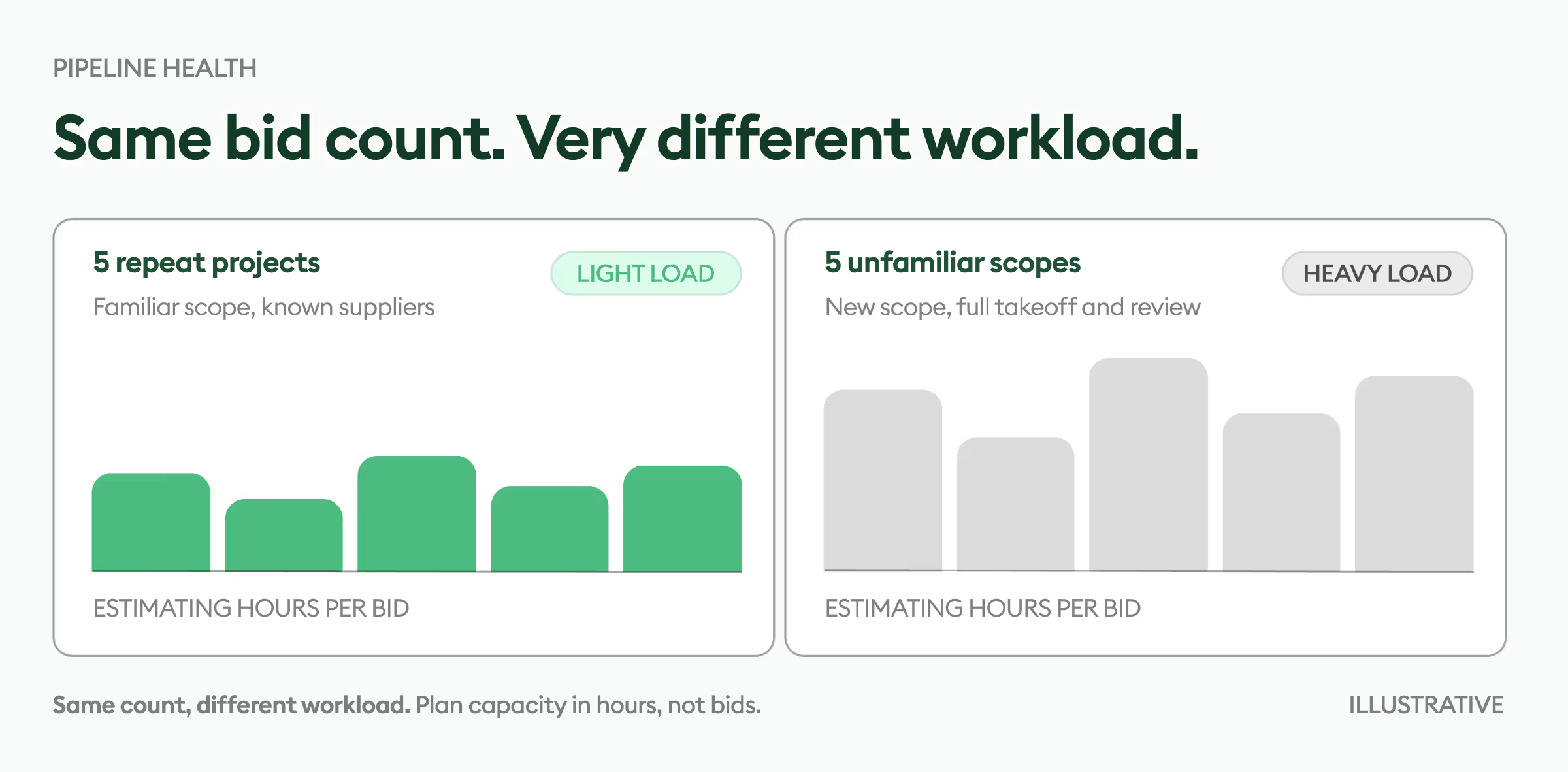
- Estimation workload capacity: Estimated hours to finish each bid, compared with the team’s available time before it closes. Include takeoff, revision, and review work.
- Blocked bids: Projects waiting for an answer, a quote, or approval, with the follow-up assigned to someone.
Bid counts are a rough way to divide the workload. An estimator with three complex jobs may have less spare time than a colleague with five familiar ones. Remaining hours give the manager a more useful basis for assigning the next invitation. Over a longer period, the construction bid hit ratio shows how many decided bids became wins; it serves a different purpose from the weekly capacity view.
How to Set Up a Bid Tracking Workflow
A workflow only helps if every bid follows the same steps, so start by agreeing on who owns each date, question, and price before the first invitation arrives.
How to Schedule Bid Reviews Before Submission
Work back from the upload deadline to put these dates on the calendar:
- Submission buffer: Time to assemble and upload the signed package, with room to fix missing files or a failed upload.
- Final review: Approval of scope and price, finished before the submission buffer starts.
- Subcontractor prices: Quotes due early enough for the estimator to check them before final approval.
- RFI schedule: An internal question deadline ahead of the issuer’s cutoff, plus time to review questions and reprice after answers arrive.
Allow more time for a complex package. A bid extension changes the RFI dates only if the notice says so.
Who Should Manage RFIs and Addenda?
For each addendum, record:
- Who received it and when it reached estimating.
- The estimator responsible for reviewing and pricing the changes.
- Backup contacts for receipt and pricing.
- The task still open, such as a drawing review or revised supplier quote.
The same applies to RFIs. Someone follows up for the response; the affected estimator works out what it means for the bid. Keep any remaining pricing task open after the question has been answered. Where the response changes the bid documents, follow the formal addendum requirements in the bid instructions rather than assuming the email is sufficient.
Bid Submission Checklist: Addenda, Pricing, and Acknowledgments
Give the final check to two people:
- Document check: Compare your addendum register with the issuer’s list or official plan room.
- Bid check: Confirm that the drawings, prices, and required acknowledgments reflect those addenda.
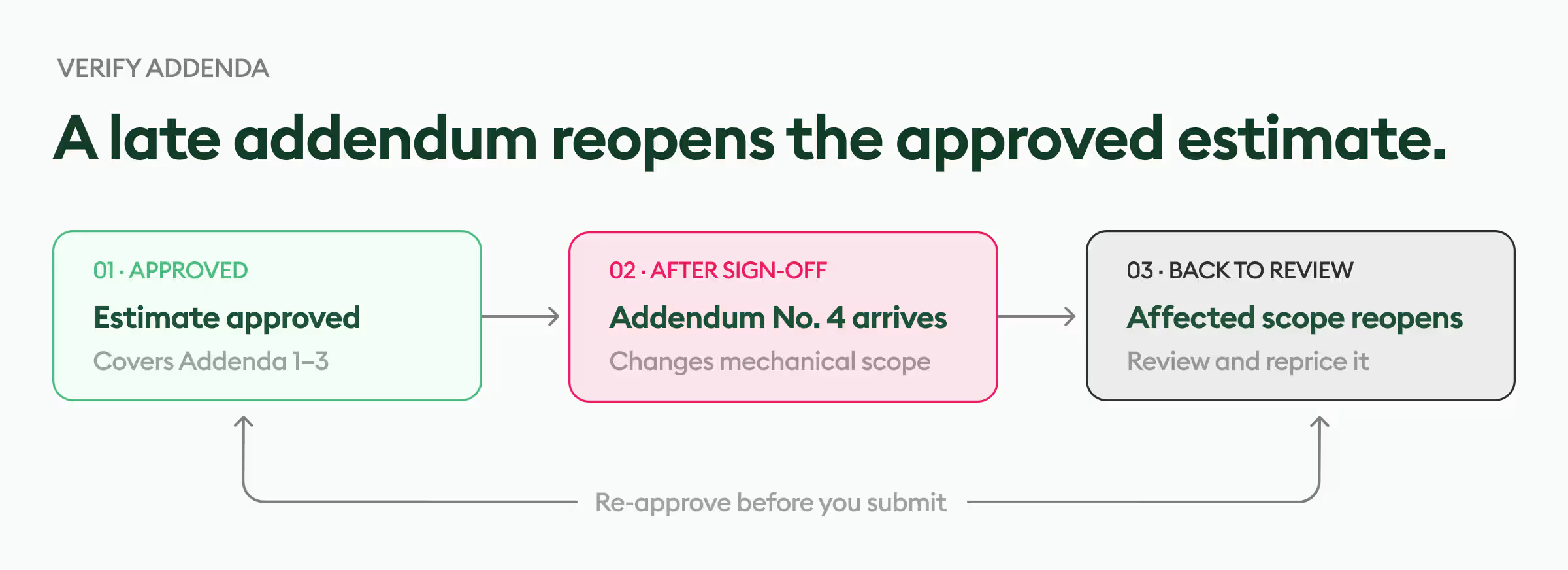
The file history should also make the priced set easy to identify. Retain the older versions. If last-minute bid addenda arrive after approval, send the affected scope back for review.
How to Verify Automated Bid Updates
A failed inbox or plan-room import can leave old information on screen. If your software supports these connections, make sure the team can spot a problem:
- Show when the import last succeeded, so an old result is easy to spot.
- Name the person who will investigate a failed import.
- For permitted scraping, include checks for expired logins and changes to the source page.
- Compare deadlines and addenda with the official source before submitting.
Which Bid Submission Records Should You Keep?
Keep the submission record separate from the working estimate. Save:
- The exact package sent to the client.
- Upload receipt or confirmation email showing the submission time.
- Copies of any resubmissions, with a note identifying the accepted version.
Bottom Line
Keep bid deadlines, RFIs, and addenda in the same project record, with an owner for every outstanding task. When a new drawing arrives, or an RFI is answered, follow the change through to the estimate. The right dashboard is one your team can keep current and use to check what still needs doing before the bid goes out.
Beam AI’s bid dashboard gives estimating teams a shared place to manage those updates alongside their opportunities. Schedule a Beam AI demo to see how bid deadlines, RFIs, and addenda would fit into your team’s estimating process.





.jpg)